Operating Neon Law Navigator
Open any slide to read it. View them all to unlock your certificate.
Chapter 1
Intro
Deploy your own
Follow this workshop to stand up your own Neon Law Navigator. navigator ops gcp setup stands the same Rust stack our
attorneys run up on your Google Cloud project. Free, open, and yours to keep.
Agenda
Six steps, each tagged with its Bloom verb. You are the admin operator; the navigator CLI is the instrument:
- Create — stand up a billed project and authenticate.
- Predict — run
--dry-runand read every API call before sending one. - Identify — name the twenty-three Google Cloud APIs the provisioner enables.
- Explain — describe the VPC, five core buckets, optional archive/telemetry lanes, private image registry, and three service deployments.
- Execute — bring up the cluster, the static IP, and Fleet membership.
- Verify — ship the service images and confirm
/readyzanswers 200.
Chapter 2
Prepare Google Cloud
Bring your own project
navigator ops gcp setup provisions into a project; it does not create one. Start by creating a project and attaching
a billing account, then authenticate so the CLI can act as you:
gcloud projects create your-project-id --name "Neon Law Navigator"
gcloud billing projects link your-project-id --billing-account "$BILLING_ACCOUNT_ID"
gcloud auth login --force --update-adc
gcloud auth print-access-token >/dev/null
gcloud auth application-default print-access-token >/dev/null
For the Navigator matrix, prove billing is enabled on the hub and all three runtime projects before provisioning:
for project in \
  ghcr neon-law-stg neon-law-prod neon-law
do
  gcloud billing projects describe "$project" \
    --format='value(projectId,billingEnabled)'
done
All five lines must end in True. If one is False, attach it before running setup:
gcloud billing projects link neon-law-prod \
  --billing-account "$BILLING_ACCOUNT_ID"
Dry-run first
Before you change anything, read the plan. The --dry-run flag records every REST call and gcloud shell-out and
prints them without sending traffic:
cargo run -p cli -- ops gcp setup --project-id your-project-id --dry-run
Private assets and domain restricted sharing
Every deployment bucket remains private. navigator ops gcp setup grants the deployment Google service account
roles/storage.objectAdmin on its assets, documents, exports, logs, and applications buckets, then maps both Kubernetes
service accounts (navigator-web and workflows-service) to that Google identity through Workload Identity. It never
adds allUsers and never changes constraints/iam.allowedPolicyMemberDomains. The applications bucket holds each
Project's published client-portal bundle at {project-code}/portal/, which web streams same-origin through
/app/projects/{code}/portal so the session and Project-participation gate stay on every request.
The public website receives only marketing bytes through GET /assets/*. web reads that object from
NAVIGATOR_ASSETS_BUCKET with the deployment identity and returns it with its stored content type,
X-Content-Type-Options: nosniff, and a one-hour public cache. Unsafe keys and missing objects return 404; storage
failures return 502. There is no parallel anonymous route for documents, exports, or logs. This is an application
delivery boundary, not a Navigator persons.role or Project-participation grant.
Set NAVIGATOR_ASSET_BASE_URL=$NAV_BASE_URL/assets in each deployment's config.toml — it is a plaintext coordinate
the ops ship preflight requires. Setup also gives the active gcloud identity the same bucket-scoped object CRUD role
so the operator and the Kubernetes runtime can inspect and repair objects without a public or project-wide grant.
Publish the public asset inventory before ops ship. A full or image-only roll reads NAVIGATOR_ASSETS_BUCKET and
stops before any rollout when a required object is missing or the bucket cannot be read. The preflight and the post-roll
check use one inventory. On a source checkout that inventory is every markdown image under server/content, every
responsive gallery variant, the brand media keys, and every licensed webfont face. On a deploy-only checkout
(--deployments-dir with no server/content directory) blog references are absent, and the inventory is the workshop
images embedded in the CLI plus those same gallery variants, brand media keys, and fonts. Restart-only skips both
checks.
navigator ops assets build --src /path/to/source-jpegs
navigator ops assets upload
navigator ops assets fonts upload --family eb-garamond --dir /path/to/woff2
navigator site asset upload --host <host> img/<slug>/<file>
assets build then assets upload publishes the gallery variants. assets fonts upload publishes one licensed family.
site asset upload publishes one finished image, including brand media and a workshop slide. Run the publish that
covers the inventory, then ops ship.
After setup, verify both identities and reject an anonymous principal:
runtime_gsa="$NAVIGATOR_GCP_SERVICE_ACCOUNT_ID@$NAVIGATOR_GCP_PROJECT_ID.iam.gserviceaccount.com"
operator_account="$(gcloud config get-value account)"
case "$operator_account" in
  *.gserviceaccount.com) operator_member="serviceAccount:$operator_account" ;;
  *) operator_member="user:$operator_account" ;;
esac

for bucket_name in \
  "$NAVIGATOR_ASSETS_BUCKET" \
  "$NAVIGATOR_DOCUMENTS_BUCKET" \
  "$NAVIGATOR_EXPORTS_BUCKET" \
  "$NAVIGATOR_LOGS_BUCKET"
do
  iam_rows="$(
    gcloud storage buckets get-iam-policy "gs://$bucket_name" \
      --flatten='bindings[].members[]' \
      --format='value(bindings.role,bindings.members)'
  )"
  printf '%s\n' "$iam_rows" |
    awk -v runtime="serviceAccount:$runtime_gsa" -v operator="$operator_member" '
      $1 == "roles/storage.objectAdmin" && $2 == runtime { runtime_ok = 1 }
      $1 == "roles/storage.objectAdmin" && $2 == operator { operator_ok = 1 }
      $2 == "allUsers" { public = 1 }
      END { if (!runtime_ok || !operator_ok || public) exit 1 }
    '
done
The Navigator deployment matrix
One deployments/<name>/ directory is one deployment. Its config.toml supplies the project, region, cluster,
namespace, domain, and immutable brand image, and its secrets.enc.yaml the mail and provider credentials, for exactly
one site; it never shares a store database, bucket, Kubernetes namespace, or runtime Secret with another row.
| Deployment | GCP project | Site | Image | Resource prefix |
|---|---|---|---|---|
neon-law-stg | neon-law-stg | staging.neonlaw.com | neon-server | neon-law-stg |
neon-law-prod | neon-law-prod | www.neonlaw.com | neon-server | neon-law-prod |
neon-law-prod | neon-law | www.neonlaw.com | neon-server | neon-law-prod |
The /app mount and HTTP route ownership
/app is the container filesystem mount, not a public URL prefix. The images install their executable and common
runtime material there:
| Image | Entrypoint | Shared mounted material |
|---|---|---|
neon-server | /app/neon | /app/public, /app/content, /app/templates |
neon-server | /app/neon | /app/public, /app/content, /app/templates |
Each executable supplies only its public brand routes to portal::bootstrap. The mounted application crate always owns
these HTTP paths and every descendant:
- operational and public ingress:
/version,/assets/*,/webhook/*,/docusign/*,/public/*, and/dioxus-demo; - application and control surfaces:
/app/*,/app/api/*,/app/health,/app/readyz,/app/mcp/*,/auth/*, and/docs/*; - API documentation:
/app/apiand/app/api/openapi.json.
The brand-owned public routes are:
- Neon Law:
/,/contact,/team,/team/nick,/blog,/blog/{slug},/notations,/workshops/*,/presentations/*,/privacy,/terms,/robots.txt,/sitemap.xml, and/llms.txt.
This precedence is fail-closed, not merge order. Each brand declares every route it mounts; startup returns an error if an exact path or descendant overlaps a Navigator-owned prefix. A brand therefore cannot shadow data access, authorization, control, API, health, or protocol routes.
neon — the whole brand seam
A brand crate is exactly one value: the portal::hosting::Brand each compiles — its key, its telemetry service name,
and the bounded public routes listed on the previous slide. Everything else is the shared application they mount, and
the portal renders under the mounting brand's chrome, so branding the binary brands the portal too: one brand seam
carries the public site, the signed-in portal, and the telemetry identity together.
That thinness is the customization story. A custom Navigator changes minimal surface area: write your own brand crate in
the neon shape — a Brand value and a call to the shared run loop, nothing more — build it into your own
<brand>-server image, and interact with the remaining published images (navigator-workflows-service, the trigger
images) unchanged. The two brand Containerfiles are deliberately identical modulo the brand name, so the image recipe
for a new brand is the existing one with your crate's name.
Live rollout checkpoint
The rollout checkpoint is the repository's deployment contract:
Five unconditional private buckets — assets, documents, exports, logs, and applications — plus optional archive and
telemetry lanes when named. Project growth adds rows and logical key space; it never creates a cloud bucket per Project.
Each portal lives under its {project-code}/portal/ prefix in the applications bucket. The documents bucket stores
Project-scoped content-addressed projects/<code>/documents/<sha> objects, while Surreal asset rows carry the Project
association, visibility, and provenance used for authorization. Marketing bytes remain available through the same-origin
/assets/* application route while the bucket itself stays private and does not grant allUsers.
New clusters are created with --enable-fleet; the subsequent idempotent reconciliation can therefore report Changing existing fleet membership is not supported. Navigator treats only that exact response as already reconciled and
continues; unrelated Fleet errors still stop setup.
Infrastructure is not deployment. A completed setup provisions infrastructure but not a running application. Ship an
immutable release and prove /readyz, /version, certificate readiness, Restate registration, and the browser surface
before posting the #navigator handoff.
For a prefix <name>, set NAVIGATOR_GKE_CLUSTER_NAME=<name>, NAVIGATOR_GKE_CONTEXT=gke_<project>_<region>_<name>,
NAVIGATOR_K8S_NAMESPACE=<name>, NAVIGATOR_VPC_NAME=<name>-vpc, NAVIGATOR_SUBNETWORK_NAME=<name>-subnet,
NAVIGATOR_GATEWAY_IP_NAME=<name>-gateway-ip, NAVIGATOR_ASSETS_BUCKET=<name>-assets,
NAVIGATOR_DOCUMENTS_BUCKET=<name>-documents, NAVIGATOR_EXPORTS_BUCKET=<name>-exports,
NAVIGATOR_LOGS_BUCKET=<name>-logs, NAVIGATOR_APPLICATIONS_BUCKET=<name>-applications,
NAVIGATOR_GCP_SERVICE_ACCOUNT_ID=<name>-web, NAVIGATOR_DRIVE_GCP_SERVICE_ACCOUNT_ID=<name>-drive, and
NAVIGATOR_WEB_SECRET_NAME=<name>-web-secrets. Bucket names are global; add one stable organization prefix if a short
bucket name is already taken.
Also set NAVIGATOR_GCP_PROJECT_ID, NAVIGATOR_GCP_LOCATION, NAVIGATOR_PUBLIC_HOST, NAVIGATOR_WORKFLOWS_HOST,
NAV_BASE_URL=https://$NAVIGATOR_PUBLIC_HOST, NAVIGATOR_WORKFLOWS_URL=https://$NAVIGATOR_WORKFLOWS_HOST/,
NAVIGATOR_WEB_IMAGE, and NAVIGATOR_ASSET_BASE_URL=$NAV_BASE_URL/assets in that deployment's
deployments/<name>/config.toml. Set that row's own NAVIGATOR_SURREAL_* coordinates and credentials in its
secrets.enc.yaml.
Keep the mail rail complete in every deployment's secrets.enc.yaml: SENDGRID_API_KEY, SENDGRID_FROM_EMAIL,
SENDGRID_INBOUND_SECRET, SENDGRID_INBOUND_PUBLIC_KEY, SENDGRID_EVENTS_SECRET, and SENDGRID_EVENTS_PUBLIC_KEY;
staging uses non-production SendGrid credentials and production uses live credentials authenticated for its domain.
Provision each row with the same region-agnostic command — one run per deployments/ directory, its coordinates
exported from that directory's config.toml (populate the directory first; the config is the source of every coordinate
the provisioner reads, so a row is provisioned only once its directory exists). Each run creates five core buckets and
one Autopilot cluster; configured archive and telemetry lanes are additional:
set -a; eval "$(grep ' = "' deployments/neon-law-stg/config.toml | sed 's/ = /=/')"; set +a
navigator ops gcp setup --dry-run
Check every printed project, region, resource prefix, and the two API batches. Provision the registry hub once before the runtime stacks; it runs no workloads:
navigator ops gcp hub setup \
  --project-id ghcr --region us-west4 --dry-run
navigator ops gcp hub setup \
  --project-id ghcr --region us-west4
Then apply the already-reviewed plans one deployment at a time. Keep staging first, and do not begin production until its command finishes:
set -a; eval "$(grep ' = "' deployments/neon-law-stg/config.toml | sed 's/ = /=/')"; set +a
navigator ops gcp setup
That is the live resource boundary, per deployment: five core buckets, plus any named archive/telemetry lanes, one
VPC/subnet pair, one reserved gateway address, one Autopilot cluster, one KMS key, and two deployment service accounts.
The command also enables the twenty-three required APIs in that runtime project. A completed command is not yet a
deployed website; ops ship, DNS, and the browser checks later in this workshop remain required.
Setup provisions no database and generates no credential, so there is nothing printed to record. The store's own
credentials go into deployments/<name>/secrets.enc.yaml (sops set — the plaintext never touches disk), then
navigator ops secrets apply --deployment <name>; rotation happens at the provider first, per
docs/deployment-secrets.md.
Resolve every reserved address and record the public value as NAVIGATOR_GATEWAY_IP in the matching config.toml — an
IP is a public coordinate, so it is edited and committed like any other:
for name in $(ls deployments); do
  set -a; eval "$(grep ' = "' "deployments/${name}/config.toml" | sed 's/ = /=/')"; set +a
  echo "${name}:"
  gcloud compute addresses describe "$NAVIGATOR_GATEWAY_IP_NAME" \
    --global --project "$NAVIGATOR_GCP_PROJECT_ID" --format 'value(address)'
done
Populate the matching local Kubernetes context before shipping a row:
set -a; eval "$(grep ' = "' deployments/neon-law-stg/config.toml | sed 's/ = /=/')"; set +a
gcloud container clusters get-credentials \
  "$NAVIGATOR_GKE_CLUSTER_NAME" --region "$NAVIGATOR_GCP_LOCATION" \
  --project "$NAVIGATOR_GCP_PROJECT_ID"
The resulting context name must equal that config's NAVIGATOR_GKE_CONTEXT. Repeat once for each deployment you are
operating.
The canonical matrix is the compact reference for every row.
Set one site to one version
The version is a release tag, never latest. To set one site, name its deployment with the required --deployment flag
and replace YY.M.D with the published tag — every coordinate comes from deployments/<name>/config.toml, never the
shell. The command preflights that the selected brand image and worker image exist, checks the Secret keys before
changing Kubernetes, then records the tag in the deployment.
navigator ops ship --deployment <row> --deployments-dir . --tag YY.M.D

curl --fail --show-error https://www.neonlaw.com/version
The #navigator hand-off derives its exact command list from the deployments/ tree — one run per directory, staging
first, then the two production rows:
navigator ops ship --deployment <row> --deployments-dir . --tag YY.M.D
navigator ops ship --deployment <row> --deployments-dir . --tag YY.M.D
navigator ops ship --deployment <row> --deployments-dir . --tag YY.M.D
Staging goes first. Do not start either production row until staging /readyz and /version checks pass; the two
production rows gate on staging and not on each other, which is why the release run rolls them in parallel. To preview
without changing one site, append --dry-run; to refresh its pods after a secret rotation without changing the version,
use --restart-only. A deployment can be named here only once it has a deployments/<name>/ directory; that directory
is what puts it in this list.
Chapter 3
Provision the Infrastructure
The APIs that light up
A real run first enables twenty-three Google Cloud APIs in bounded Service
Usage batchEnable calls: compute, servicenetworking,
storage, iam, iamcredentials, sts, cloudresourcemanager, artifactregistry, container, gkehub,
gkebackup, anthosconfigmanagement, logging, monitoring, cloudtrace, secretmanager, certificatemanager,
identitytoolkit, speech, drive, admin, cloudkms, and aiplatform.
Network and storage buckets
With the APIs on, the CLI provisions the data plane and runtime identity:
- A custom-mode VPC with one explicitly named regional subnet and private Google access. The deployment's GKE cluster is pinned to both names.
- Five private Cloud Storage buckets, all uniform bucket-level access:
-assets(marketing objects served through the same-origin/assets/*application route),-documents(client documents),-exports(Parquet/Iceberg archives),-logs(the Nearline log-sink destination), and-applications(each Project's published client-portal bundle, streamed same-origin through/app/projects/{code}/portal). A deployment may also name separate archive and telemetry buckets for long-term snapshots and telemetry landing data. - A deployment-specific Google service account with the Secret Manager accessor role, object access on only that
deployment's five core buckets and any named archive/telemetry lanes, Workload Identity bindings for the namespace's
navigator-webandworkflows-serviceKubernetes service accounts, and permission to sign its own GCS URLs. - A separate Workspace Drive service account with no runtime GCP roles. An operator creates one JSON key, records it
in that deployment's
secrets.enc.yaml, and grants its OAuth client domain-wide delegation in the selected Workspace.
How a Project portal reaches a client
Each Project has its own source repository — neon-law/acme, say — holding a React application under portal/. That
bundle is never committed anywhere in Navigator, and it never touches git on the way to a client. It is built in the
Project repository's own CI, published to the deployment's private -applications bucket, and streamed from there by
web — same-origin, and only after the session and Project participation row are checked.
flowchart LR
  subgraph repo["Project repo — neon-law/acme"]
    src["portal/ — React + Vite"]
    ci["CI on push to main:<br/>validate + application-publish"]
    src --> ci
  end
  subgraph gcp["Deployment project — neon-law"]
    bucket[("<deployment>-applications<br/>acme/portal/ — private, UBLA")]
  end
  subgraph nav["Navigator — neon-server"]
    web["web streams the bundle at<br/>/app/projects/acme/portal/"]
  end
  client(["Client browser"])

  ci -- "keyless WIF (navigator-app-publisher):<br/>upload dist/ — hashed assets first,<br/>index.html last, never delete" --> bucket
  client -- "GET /app/projects/acme/portal/" --> web
  web -- "check session + participation" --> web
  web -- "stream objects, same-origin" --> bucket
A document's bytes and authorization are separate
Inside the documents bucket, the storage key is content-addressed: store::documents::ingest_bytes writes bytes at
blobs/<sha256>. The Surreal asset row is the Project-scoped record: it carries the Project association, provenance,
visibility, and the reference to that object. The portal checks that row before streaming a document, so clients never
receive bucket credentials or direct object URLs.
The ingest deduplication decision is scoped to the Project, even though the key shape is not: an existing matching asset on the same Project avoids a second write, while a matching asset on another Project does not authorize reuse of its row. Because two rows can name the same content-addressed key, a governed expunge checks whether another asset row still references the object before deleting its bytes. That reference check keeps a deletion in one Project from removing bytes still needed by another.
This is why Project growth does not require a documents bucket per Project. The bucket is a private deployment lane; the Surreal record supplies the Project boundary, and the application supplies the authorization boundary. The applications lane uses a different shape: each published portal is under its Project-code prefix and the publisher's IAM condition enforces that prefix.
A private image registry
With storage in place, the provisioner creates the one private Artifact Registry repository that every navigator container image lives in, and the identities that push to and pull from it:
- A Docker-format repository (default
navigator) atyour-region-docker.pkg.dev/your-project-id/navigator. - A keep-the-last-10-versions cleanup policy — a
KEEPrule retaining the last 10 versions of each image plus aDELETErule for everything else. Retention is a count rather than an age on purpose: an age-based rule is only safe while releases outrun it, and releases are tag-driven, so a quiet fortnight under the old 7-day rule would have let the registry delete the versions production was running. A count cannot expire. Keep policies take precedence over delete policies, which is what makes the pair mean "keep ten, delete the rest" — the delete half matches every version, so it is never applied alone. - A CI push identity (
navigator-ci-pusherservice account) with a repo-scopedroles/artifactregistry.writerbinding, plus a GitHub Workload Identity federation pool and provider so CI authenticates keyless — no downloaded service-account key — pinned to this one repository and to the refs allowed to publish. - A repo-scoped
roles/artifactregistry.readerbinding for the GKE Autopilot node identity, so the cluster can pull.
Two values decide whether that federation works at all, and both are easy to get wrong in a way nothing reports:
issuerUri           https://token.actions.githubusercontent.com
                    (on your own GHE tenant: https://token.actions.<your-tenant>.ghe.com)
attributeCondition  assertion.repository == '<owner>/<repo>'
                        && (assertion.ref == 'refs/heads/main' || assertion.ref.startsWith('refs/tags/'))
Navigator itself runs on github.com, so the public issuer is the one this workshop's own deployment uses. The tenant issuer above is for readers who do not.
The cluster comes up
The cluster is the one part driven through gcloud rather than REST. In order, the provisioner reserves a static IP,
creates the GKE Autopilot cluster, and
registers it as a Fleet member:
cargo run -p cli -- ops gcp setup --project-id your-project-id --region us-west4
What setup owns — and what follows it
ops gcp setup provisions the hostable cloud substrate: APIs, VPC and subnet, Cloud Router/NAT, private buckets,
identities, registry access, GKE, Gateway IP, workload identity, Fleet integration, and KMS. It deliberately stops at
the cloud/cluster boundary. Finish the deployment through these adjacent owners:
| Need | Adjacent operation |
|---|---|
| DNS | Run navigator ops dns setup; DNS may be outside GCP, while setup owns only the stable Gateway IP. |
| TLS and Gateway manifests | Run navigator ops ship; it renders and applies Gateway, certificate, and routes. |
| Restate | Apply the Restate operator and manifests, then let ops ship re-register the worker. |
| Secret values | Run navigator ops secrets apply; decrypts and writes Secret Manager plus the Kubernetes Secret. |
Chapter 4
Environment Matrix
Three operating modes, two deployment profiles
| Operating mode | Selector | Runtime and data posture |
|---|---|---|
| Test | dev + NAVIGATOR_CI_HARNESS=1 | Schemas/KIND; sample matters; canonical seed + test fixtures |
| Dev | dev; harness normally unset | KIND/cloud namespace; sandbox vendors; canonical seed + sample matters |
| Production | production, empty, or unset | Hosted services; production vendors; canonical seed + live data |
The deployment that says its matters are sample
NAVIGATOR_SIMULATED_MATTERS is the second selector, and it answers a different question from the first. The profile
above decides which runtime wiring a boot gets; this decides whether the matters in front of a visitor are invented.
Left unset or empty it follows the profile: a dev boot carries sample matters because that is all a dev boot has,
and a production boot does not, because production is where the real files are. Exactly true or false overrides
that in both directions, and every other value — TRUE, 1, yes, a case or whitespace variant — is rejected rather
than resolved to the permissive answer. That exactness is the point: a typo that quietly read as true would seed
invented clients into a database of real ones.
The override that matters is true under a production profile, which is exactly what neon-law-stg is. Both of its
selectors are production on purpose, so nothing in the running process can tell it apart from the row holding real
client files. It therefore says so itself, in deployments/neon-law-stg/config.toml:
NAVIGATOR_SIMULATED_MATTERS = "true"
Two things follow from that value. store::seed applies the sample-matter fixture, so the row carries
sample-litigation, sample-transactional, and sample-estate rather than an empty portfolio. And every page
publishes a site-wide banner saying the matters are sample — which is why staging.neonlaw.com is a link worth handing
to somebody, because a demo matter cannot be mistaken for a client's file.
It is a coordinate, not a credential, so it lives in config.toml beside the buckets and hostnames rather than in
that deployment's secrets.enc.yaml. Adding it needs no SOPS re-encryption on either row.
neon-law-prod states "false" for documentation rather than for behaviour. The code already reads a missing value as
false under a production profile, and ops ship renders false into the web env when a deployment's config omits
the key, so the substitution is deliberately optional: a config that never mentions it still renders and still ships. A
key that could halt a production rollout by being deleted would be a worse failure than the one it guards against.
Configuration precedence: the first source wins
| Priority | Source | Who owns it | Typical contents |
|---|---|---|---|
| 1 | process environment | shell, Kubernetes, CI | Explicit one-run or deployed values |
| 2 | .env | developer/operator; gitignored | Optional sandbox credentials and local overrides |
| 3 | .devx/env | generated by the dev CLI | Local endpoints, ports, harness, session key |
| 4 | code defaults | each typed config loader | Ports, content directories, optional feature fallbacks |
Local dev controls: inputs read by navigator dev
| Concern | Environment variables | Defaults / effect |
|---|---|---|
| Topology | NAVIGATOR_KIND_CLUSTER, NAVIGATOR_K8S_NAMESPACE | navigator, navigator |
| Dependency overlay | NAVIGATOR_KIND_DEPS_OVERLAY | deps-only KIND |
| Full KIND overlay | NAVIGATOR_KIND_OVERLAY | full KIND |
| GKE overlay | NAVIGATOR_GKE_OVERLAY | example GKE manifests |
| Second store port | NAVIGATOR_KIND_SURREAL_PORT | 18000 |
| Restate ports | NAVIGATOR_KIND_RESTATE_INGRESS_PORT, NAVIGATOR_KIND_RESTATE_ADMIN_PORT | 9080, 9070 |
| Identity port | NAVIGATOR_KIND_RAUTHY_PORT | 30080 |
| Storage port | NAVIGATOR_KIND_GARAGE_S3_PORT | 30900 |
| Web port | NAVIGATOR_KIND_WEB_PORT | 3001 |
delete-your-data web port | NAVIGATOR_LOCAL_DELETE_YOUR_DATA_PORT | 3011; bound alongside PORT |
lawyer-shook web port | NAVIGATOR_LOCAL_LAWYER_SHOOK_PORT | 3021; bound alongside PORT |
| Observability | NAVIGATOR_KIND_OPENOBSERVE_PORT, NAVIGATOR_KIND_OPENOBSERVE_OTLP_PORT | 5080, 5081 |
| Documents key | NAVIGATOR_GARAGE_ACCESS_KEY | deterministic KIND-only default |
| Documents secret | NAVIGATOR_GARAGE_SECRET_KEY | deterministic KIND-only default |
| Assets key | NAVIGATOR_GARAGE_ASSETS_ACCESS_KEY | deterministic KIND-only default |
| Assets secret | NAVIGATOR_GARAGE_ASSETS_SECRET_KEY | deterministic KIND-only default |
| Applications key | NAVIGATOR_GARAGE_APPLICATIONS_ACCESS_KEY | deterministic KIND-only default |
| Applications secret | NAVIGATOR_GARAGE_APPLICATIONS_SECRET_KEY | deterministic KIND-only default |
| LFS key | NAVIGATOR_GARAGE_LFS_ACCESS_KEY | deterministic KIND-only default |
| LFS secret | NAVIGATOR_GARAGE_LFS_SECRET_KEY | deterministic KIND-only default |
| Published demo image | NAVIGATOR_IMAGE_TAG | latest dated YY.M.D tag when dev deploy pulls images |
Local runtime: what .devx/env generates
| Concern | Generated environment variables |
|---|---|
| Profile and listener | PORT, NAVIGATOR_ENVIRONMENT, NAVIGATOR_CI_HARNESS |
| Repository writer | NAVIGATOR_GIT_REPO_ROOT |
| Store | NAVIGATOR_SURREAL_ENDPOINT, NAVIGATOR_SURREAL_NAMESPACE, NAVIGATOR_SURREAL_DATABASE |
| Store credentials | NAVIGATOR_SURREAL_USER, NAVIGATOR_SURREAL_PASSWORD |
| Storage driver | NAVIGATOR_STORAGE_BACKEND, NAVIGATOR_STORAGE_ENDPOINT |
| Storage buckets | NAVIGATOR_STORAGE_BUCKET, NAVIGATOR_ASSETS_BUCKET, NAVIGATOR_LFS_BUCKET |
| Applications bucket | NAVIGATOR_APPLICATIONS_BUCKET |
| SurrealDB operational archive bucket | NAVIGATOR_SURREAL_ARCHIVES_BUCKET |
| Iceberg-archive bucket | NAVIGATOR_ARCHIVES_BUCKET |
Cloud-only archive buckets (ops gcp setup, not locally generated) | NAVIGATOR_TELEMETRY_BUCKET |
| Storage region | NAVIGATOR_STORAGE_REGION |
| Documents credentials | NAVIGATOR_STORAGE_ACCESS_KEY, NAVIGATOR_STORAGE_SECRET_KEY |
| Assets credentials | NAVIGATOR_ASSETS_ACCESS_KEY, NAVIGATOR_ASSETS_SECRET_KEY |
| Applications credentials | NAVIGATOR_APPLICATIONS_ACCESS_KEY, NAVIGATOR_APPLICATIONS_SECRET_KEY |
| LFS credentials | NAVIGATOR_LFS_ACCESS_KEY, NAVIGATOR_LFS_SECRET_KEY |
| Iceberg-archive credentials | NAVIGATOR_ARCHIVES_ACCESS_KEY, NAVIGATOR_ARCHIVES_SECRET_KEY |
| Browser OIDC | OAUTH_ISSUER_URL, OAUTH_CLIENT_ID, OAUTH_CLIENT_SECRET, OAUTH_REDIRECT_URI, SESSION_SECRET |
| Sign in with Microsoft | OAUTH_MICROSOFT_CLIENT_ID, OAUTH_MICROSOFT_CLIENT_SECRET |
| Microsoft tenant gate | OAUTH_MICROSOFT_ALLOWED_TENANTS, OAUTH_MICROSOFT_ISSUER_URL |
| Sign in with Apple | OAUTH_APPLE_CLIENT_ID, OAUTH_APPLE_TEAM_ID, OAUTH_APPLE_KEY_ID, OAUTH_APPLE_PRIVATE_KEY |
| Policy and workflows | RESTATE_BROKER_URL |
| Attachment scanner | NAVIGATOR_CLAMD_ADDR |
| Harness-only integration placeholders | SENDGRID_API_KEY, SENDGRID_INBOUND_SECRET |
| Harness sink URL | SENDGRID_BASE_URL, NAVIGATOR_SENDGRID_HARNESS_SECRET |
| Telemetry endpoint and UI | OTEL_EXPORTER_OTLP_ENDPOINT, NAVIGATOR_OPENOBSERVE_URL |
| Telemetry credentials | NAVIGATOR_OPENOBSERVE_USERNAME, NAVIGATOR_OPENOBSERVE_PASSWORD |
| Telemetry routing | NAVIGATOR_OPENOBSERVE_ORGANIZATION, NAVIGATOR_OPENOBSERVE_STREAM |
The store: SurrealDB
| Question | SurrealDB |
|---|---|
| Owns the data | Yes — every table |
| Local shape | KIND pod, surreal start memory |
| Schema | One idempotent DEFINE file plus schema_version |
| Tests | Embedded kv-mem engine per test |
| Deployed | Surreal Cloud |
| Row-level permissions | PERMISSIONS NONE on every table, deliberately |
Where SurrealDB authorization lives
| Layer | Decides | During and after the port |
|---|---|---|
persons.role | The tier: owner, admin, lawyer, clerk, client | Unchanged — the sole tier answer |
person_project_roles.participation | Per-matter scope | Unchanged — the sole scope answer |
| Embedded Rego | Renders the decision per request | Compiled at web-process boot |
Surreal PERMISSIONS | Per-row engine enforcement | Explicit NONE; every process signs in as root |
Deployed runtime: core web and worker wiring
| Concern | Environment variables |
|---|---|
| Profile fence | NAVIGATOR_ENVIRONMENT, NAVIGATOR_CI_HARNESS, NAVIGATOR_CREDENTIAL_ENVIRONMENT |
| Sample matters | NAVIGATOR_SIMULATED_MATTERS |
| HTTP identity | PORT, NAV_BASE_URL, CANONICAL_HOST, NAVIGATOR_RATE_LIMIT_PER_MIN |
| Branding and public assets | NAVIGATOR_CUSTOM_BRANDING, NAVIGATOR_ASSET_BASE_URL |
| Store | NAVIGATOR_SURREAL_ENDPOINT, NAVIGATOR_SURREAL_NAMESPACE, NAVIGATOR_SURREAL_DATABASE |
| Storage driver | NAVIGATOR_STORAGE_BACKEND, NAVIGATOR_STORAGE_ENDPOINT, NAVIGATOR_STORAGE_REGION |
| Documents/exports | NAVIGATOR_DOCUMENTS_BUCKET, NAVIGATOR_STORAGE_BUCKET, NAVIGATOR_EXPORTS_BUCKET |
| Other buckets | NAVIGATOR_ASSETS_BUCKET, NAVIGATOR_LFS_BUCKET |
| Filesystem storage | NAVIGATOR_STORAGE_FS_ROOT |
| Entity Workspace Drive | Per-Workspace Drive coordinates listed below |
| Generic S3 key | NAVIGATOR_STORAGE_ACCESS_KEY, NAVIGATOR_STORAGE_SECRET_KEY |
| Temporary S3 token | NAVIGATOR_STORAGE_SESSION_TOKEN |
| Assets S3 key | NAVIGATOR_ASSETS_ACCESS_KEY, NAVIGATOR_ASSETS_SECRET_KEY |
| LFS S3 key | NAVIGATOR_LFS_ACCESS_KEY, NAVIGATOR_LFS_SECRET_KEY |
| Exports S3 key | NAVIGATOR_EXPORTS_ACCESS_KEY, NAVIGATOR_EXPORTS_SECRET_KEY |
| Iceberg-archive bucket | NAVIGATOR_ARCHIVES_BUCKET |
| Iceberg-archive S3 key | NAVIGATOR_ARCHIVES_ACCESS_KEY, NAVIGATOR_ARCHIVES_SECRET_KEY |
| Sessions | SESSION_SECRET |
| Restate client | RESTATE_BROKER_URL, RESTATE_AUTH_TOKEN, RESTATE_SERVICE |
| Trigger ingress | RESTATE_INGRESS_URL |
| Worker listener | WORKFLOWS_SERVICE_LISTEN |
| Telemetry and log filtering | OTEL_EXPORTER_OTLP_ENDPOINT, OTEL_SERVICE_NAME, RUST_LOG |
| Image-baked release identity | NAVIGATOR_RELEASE_TAG, NAVIGATOR_GIT_SHA, NAVIGATOR_BUILD_TIME |
Deployed runtime: identity and access
| Concern | Environment variables | Behavior when absent |
|---|---|---|
| Browser OIDC issuer | OAUTH_ISSUER_URL | Browser login is not configured |
| Browser OIDC client | OAUTH_CLIENT_ID, OAUTH_CLIENT_SECRET | Browser login is not configured |
| Browser redirect | OAUTH_REDIRECT_URI | Browser login is not configured |
| Microsoft door | OAUTH_MICROSOFT_CLIENT_ID, OAUTH_MICROSOFT_CLIENT_SECRET | Off; one provider, one button |
| Microsoft tenants | OAUTH_MICROSOFT_ALLOWED_TENANTS | Boot fails when the client id is set |
| Microsoft authority | OAUTH_MICROSOFT_ISSUER_URL | The organizations authority: work or school, any tenant |
| Apple door | OAUTH_APPLE_CLIENT_ID + three secret values | Off without client ID; boot fails if sibling missing |
| Bearer JWKS | OIDC_JWKS_URL, OIDC_AUDIENCE, OIDC_ISSUER | Deployed JWT verification |
| Bearer HMAC | OIDC_HS256_SECRET | Local/test verifier path |
| Dev bypass | OIDC_DISABLED | Off; the dev profile and production reject true / 1 |
web-env.yaml uses # NAVIGATOR_OPTIONAL_ENV OAUTH_APPLE_CLIENT_ID to mark the optional Apple client ID; ops ship
emits its entry only for a nonblank coordinate.
| Bootstrap Owner | NAVIGATOR_BOOTSTRAP_OWNER_EMAIL (config.toml) | Missing: ship refused; unset: no JIT identity |
| Protected firm Entity | NAVIGATOR_BOOTSTRAP_COMPANY | Shook Law PLLC is protected either way |
| Google token policy | GOOGLE_OAUTH_CLIENT_IDS, GOOGLE_OAUTH_REQUIRED_HD | No client/domain pin |
| Google token endpoint | GOOGLE_TOKENINFO_URL | Google default |
| Password door | NAVIGATOR_IDENTITY_PLATFORM_API_KEY | OIDC-only login |
| Password endpoint | NAVIGATOR_IDENTITY_PLATFORM_ENDPOINT | Google default |
| Identity Platform admin calls | NAVIGATOR_GCP_METADATA_ENDPOINT | GCE metadata server default |
Deployed runtime: email, signatures, and billing
| Capability | Environment variables | Dev / production rule |
|---|---|---|
| Email backend | NAVIGATOR_EMAIL_BACKEND | Must be sendgrid outside the harness |
| Outbound SendGrid | SENDGRID_API_KEY, SENDGRID_FROM_EMAIL | Required outside the harness |
| SendGrid base URL | SENDGRID_BASE_URL | Official hosts only outside the harness |
| Inbound URL gate | SENDGRID_INBOUND_SECRET | Required outside the harness |
| Inbound signature | SENDGRID_INBOUND_PUBLIC_KEY | Required when summary review is enabled |
| Attachment scanner | NAVIGATOR_CLAMD_ADDR | Required in every deployed profile; private clamd only |
| Event webhook | SENDGRID_EVENTS_SECRET, SENDGRID_EVENTS_PUBLIC_KEY | Required outside the harness |
| Threaded mail | NAVIGATOR_PARSE_HOST, NAVIGATOR_LAWYER_NOTIFY_EMAIL | Both values enable it |
| Summary opt-in | NAVIGATOR_SUMMARY_ENABLED | Enables durable review |
| Summary identity | NAVIGATOR_DEPLOYMENT_ID, NAVIGATOR_SUMMARY_CHANNEL_ID | Durable review coordinates |
| Summary envelope | NAVIGATOR_SUMMARY_ENVELOPE_RECIPIENTS | Unset/off by default; blank values fail |
| SMS intake | NAVIGATOR_SMS_NUMBER, TWILIO_AUTH_TOKEN | Off by default; a number needs the token |
| Summary Gemini model | NAVIGATOR_SUMMARY_GEMINI_MODEL | Optional Vertex model override |
| Summary Gemini location | NAVIGATOR_SUMMARY_GEMINI_LOCATION | Optional Vertex location override |
| Summary input limit | NAVIGATOR_SUMMARY_MAX_INPUT_CHARS | Optional input limit |
| Summary output limit | NAVIGATOR_SUMMARY_MAX_OUTPUT_TOKENS | Optional output limit |
| DKIM fence | NAVIGATOR_DKIM_REQUIRE_DOMAIN | Optional domain pin |
| Lawyer-sender DKIM check | none (always on) | Must pass for sender's own domain on every lawyer command/relay |
| Internal ops notices | SLACK_WEBHOOK_URL | Optional; otherwise captured in memory |
| Per-Project client-view notices | SLACK_BOT_TOKEN | Required outside the harness; creates private Project channels |
| Dash0 endpoint | DASH0_ENDPOINT | Optional staging-only integration declaration |
| Dash0 dataset | DASH0_DATASET | Required with DASH0_ENDPOINT |
| Dash0 token | DASH0_TOKEN | Encrypted Secret Manager input; required with DASH0_ENDPOINT |
| DocuSign endpoint | DOCUSIGN_BASE_URL | Declares DocuSign; demo in dev, live in production |
| DocuSign account | DOCUSIGN_ACCOUNT_ID | Environment-specific account |
| DocuSign JWT IDs | DOCUSIGN_INTEGRATION_KEY, DOCUSIGN_USER_ID | Preferred auth path |
| DocuSign JWT proof | DOCUSIGN_PRIVATE_KEY, DOCUSIGN_OAUTH_BASE | Preferred auth path |
| DocuSign static auth | DOCUSIGN_ACCESS_TOKEN | Short-lived fallback |
| DocuSign signer | DOCUSIGN_SIGNER_EMAIL, DOCUSIGN_SIGNER_NAME | Required signer identity |
| DocuSign webhook | DOCUSIGN_HMAC_KEY, DOCUSIGN_WEBHOOK_SECRET | Required once DOCUSIGN_BASE_URL is set |
| Xero tenant | XERO_TENANT_ID, XERO_BASE_URL | All Xero values select real billing |
| Xero OAuth client | XERO_CLIENT_ID, XERO_CLIENT_SECRET | Otherwise stub billing |
| Xero OAuth token | XERO_TOKEN_URL, XERO_SCOPE, XERO_ACCESS_TOKEN | Otherwise stub billing |
Deployed runtime: repositories, content, AI, and scheduled work
| Capability | Environment variables |
|---|---|
| Mounted Git writer | NAVIGATOR_GIT_REPO_ROOT |
| Forge coordinate, both required | NAVIGATOR_GIT_HOST (default github.com), NAVIGATOR_GITHUB_ORG (no default) |
| GitHub App identity | NAVIGATOR_GITHUB_APP_ID |
| GitHub App installation | NAVIGATOR_GITHUB_INSTALLATION_ID |
| GitHub App proof | NAVIGATOR_GITHUB_APP_PRIVATE_KEY |
| GitHub token fallback | NAVIGATOR_GITHUB_TOKEN (or GITHUB_TOKEN) |
| GitHub endpoint | NAVIGATOR_GITHUB_API_BASE |
| GitHub webhook receiver | NAVIGATOR_GITHUB_WEBHOOK_SECRET, NAVIGATOR_GITHUB_CANONICAL_REPOSITORY |
| Receiver identity and Restate submit | NAVIGATOR_GITHUB_APP_LOGIN, RESTATE_INGRESS_URL, RESTATE_AUTH_TOKEN |
| GitHub concurrency cap | NAVIGATOR_GITHUB_MAX_CONCURRENT |
| GitHub revision cap | NAVIGATOR_GITHUB_MAX_REVISE_ROUNDS |
| GitHub daily token cap | NAVIGATOR_GITHUB_MAX_DAILY_TOKENS |
DevX Slack worker (in workflows-service) | SLACK_WEBHOOK_URL |
| Content roots | NAVIGATOR_PUBLIC_DIR, NAVIGATOR_BLOG_DIR, NAVIGATOR_WORKSHOPS_DIR |
| CLI login file | NAVIGATOR_CREDENTIALS_FILE, NAVIGATOR_CONFIG_DIR |
| Harness worktree/cache | NAVIGATOR_WORKTREE_PATH, NAVIGATOR_CHROME_CACHE_DIR |
| Vertex coordinates | NAVIGATOR_GCP_PROJECT_ID, NAVIGATOR_GCP_LOCATION, GOOGLE_METADATA_URL |
| Contract reviewer | NAVIGATOR_CONTRACT_REVIEW_MODEL plus the same GCP project, location, and metadata variables |
| On-chain attestation | NAVIGATOR_ONCHAIN_BACKEND |
| Billing export | BILLING_EXPORT_TABLE, BIGQUERY_PROJECT |
| Billing notices | BILLING_CANARY_NOTIFY_EMAIL |
| Billing digest | BILLING_DIGEST_NOTIFY_EMAIL, BILLING_DIGEST_WINDOW_DAYS |
Provision and ship: variables read by the operator CLI
| Concern | Environment variables |
|---|---|
| GCP target | NAVIGATOR_GCP_PROJECT_ID, NAVIGATOR_GCP_LOCATION |
| GKE target | NAVIGATOR_GKE_CLUSTER_NAME, NAVIGATOR_GKE_CONTEXT, NAVIGATOR_K8S_NAMESPACE |
| VPC, subnet | NAVIGATOR_VPC_NAME, NAVIGATOR_SUBNETWORK_NAME |
| Gateway IP | NAVIGATOR_GATEWAY_IP_NAME |
| Runtime identities | NAVIGATOR_GCP_SERVICE_ACCOUNT_ID, NAVIGATOR_DRIVE_GCP_SERVICE_ACCOUNT_ID |
| Assets/documents | NAVIGATOR_ASSETS_BUCKET, NAVIGATOR_DOCUMENTS_BUCKET |
| Exports/logs | NAVIGATOR_EXPORTS_BUCKET, NAVIGATOR_LOGS_BUCKET |
| Optional fork Config Sync | NAVIGATOR_CONFIG_SYNC_REPO, NAVIGATOR_CONFIG_SYNC_DIR (unset for Navigator's three) |
| Image registry | NAVIGATOR_IMAGE_REGISTRY, NAVIGATOR_WEB_IMAGE |
| Manifest source | NAVIGATOR_GKE_OVERLAY |
| Public OAuth clients | NAVIGATOR_OAUTH_CLIENT_ID_BROWSER (required) |
| Brand and base URL | NAVIGATOR_CUSTOM_BRANDING, NAVIGATOR_PRIMARY_DOMAIN, NAV_BASE_URL |
| Public hosts | NAVIGATOR_PUBLIC_HOST, NAVIGATOR_WORKFLOWS_HOST, GOOGLE_OAUTH_REQUIRED_HD |
| Runtime Secret | NAVIGATOR_WEB_SECRET_NAME |
| Worker registration | NAVIGATOR_WORKFLOWS_URL |
| Restate admin | RESTATE_ADMIN_URL, RESTATE_ADMIN_TOKEN |
Ancillary operations and opt-in test controls
| Capability | Environment variables |
|---|---|
| Operator-local DNSimple CLI | See the operator-shell list below; never store it in a deployment config |
| GitHub release authentication | GITHUB_TOKEN |
| Xero sandbox OAuth | XERO_SANDBOX_CLIENT_ID, XERO_SANDBOX_CLIENT_SECRET |
| Engineering Slack routing | SLACK_OPS_MENTION |
| Browser-driver override | WEBDRIVER_URL, WEBDRIVER_HEADED |
| Deterministic GCP test token | DEVX_GCP_FAKE_TOKEN, ARCHIVES_FAKE_TOKEN |
| Browser gate | NAV_REQUIRE_HARNESS, NAV_REASK_SHOTS |
| Server-mode store lane | NAV_REQUIRE_SURREAL |
The DNSimple CLI transaction uses operator-shell variables DNS_SIMPLE (or legacy DNSIMPLE_API_TOKEN),
DNSIMPLE_TOKEN, DNS_ACCT, and DNS_ZONE. None belongs in a deployment config.
When sample data appears
| Surface | Local dev | Disposable dev staging | Persistent hosted rows |
|---|---|---|---|
| Canonical database seed | Always runs | Always runs | Always runs |
| Sample-matter fixture | Always runs (dev) | Always runs (dev) | neon-law-stg only |
| Test-local database fixtures | Browser/E2E harness only | Integration harness only | Never |
CapturingEmail by default | Non-production SendGrid | Production SendGrid | |
| E-signature | Stub IDs and documents | Non-binding DocuSign demo | Live DocuSign |
| Billing | StubBillingProvider when Xero is absent | Same fallback | Same fallback today |
| Contract review | Stub without Vertex | Same fallback | Reference uses Vertex |
| Navigator MCP free-form routing | NullRouter without Vertex | Same fallback | Reference uses Vertex |
Chapter 5
Configure the Trust Boundaries
Secrets: the invariants that gate the boot
web fails loudly rather than degrading silently: a missing required value crashes startup with a structured
enforce_deployment_invariants error naming exactly what is absent. So a CrashLoopBackOff is almost always a missing
secret:
kubectl logs deploy/navigator-web -n navigator
Sign-in: bring an OIDC provider; passwords live there, not here
Passwords matter — Neon Law Navigator's own database never stores a password. There is no password column and no hashing crate; the credential lives with an OIDC provider you bring, never in our database. Identity is delegated via the standard Authorization Code + PKCE flow. Four env vars wire it:
OAUTH_ISSUER_URL=...        # the provider's issuer; discovery hangs off /.well-known/openid-configuration
OAUTH_CLIENT_ID=...
OAUTH_CLIENT_SECRET=...
OAUTH_REDIRECT_URI=https://www.your-domain.example/auth/callback
Navigator speaks that flow against the provider (/auth/login → /auth/callback) and discovers every endpoint from
<issuer>/.well-known/openid-configuration, so no provider URL is hard-coded. Worked examples for Rauthy, Google,
Auth0, and Okta live in .env.example. The provider asserts only who you are (a stable sub and an email); your
persons row owns what you can do (the single role), so granting or revoking access is one SQL statement — see
docs/oidc.md for the full model.
For this workshop, that row should make you the owner. Navigator has five stored authorization roles, plus the
anonymous public visitor:
owner— the system owner, highest in authority, inheriting every Admin and Lawyer capability. Only Owner may govern another Owner identity.admin— a licensed lawyer with installation-wide administration authority. Admin cannot manage an Owner.lawyer— a licensed lawyer working assigned matters and supervising any Clerk capability the application grants.clerk— a supervised non-lawyer worker. Clerk's/clerksurface is a read-only list of firm-assigned Projects whose disclosedis_lawyer_drirow is a lawyer. Clerk has no legal-advice, approval, Git, MCP, or/app/lawyerauthority by inheritance; upload and preparation work still need their own narrow, supervised routes.client— represented people using the portal for their own matters.
Owner is the deployer's role because this class touches billing, secrets, OIDC, release state, and every Project. The
role still lives in the database, not the IdP token; your OIDC provider proves identity, then Navigator reads the
persons.role value to decide the tier.
One environment variable answers which person is the protected bootstrap Owner:
NAVIGATOR_BOOTSTRAP_OWNER_EMAIL=owner@example.com
Set NAVIGATOR_BOOTSTRAP_OWNER_EMAIL in the deployment config.toml; ops ship renders it into the web pod. Do not
copy the deployed value into Git. An unset, empty, or whitespace-only value disables bootstrap-Owner creation and
refuses the ship. On a fresh installation, the first successful OIDC login with the configured email JIT-creates its
persons row as owner; later sign-ins restore that role if the database has drifted. Its entire Person record is
immutable in Navigator so an administrator cannot rename, demote, or delete the installation's recovery identity by
accident.
After signing in as Owner or Admin, open /app/admin/people to manage the directory and change another Person's
system-wide role among owner, admin, lawyer, clerk, and client. Owner appears first because it owns the
deployed system. Only an Owner can assign or modify Owner. Admin can manage Admin and every lower tier. The
bootstrap-Owner row remains read-only, and the command boundary rejects a hand-written update or delete as well. The
Lawyer workbench does not grant role-management power. These values are persons.role; Project assignments such as
attorney, paralegal, client, and co-counsel are Participation records and do not create another authorization tier.
We recommend Google. Verifying that a person is who they claim is real work — risk signals, step-up challenges, and
hardware-key (passkey / security-key) verification — and Google invests far more in it than we could. A Google-backed
sign-in is stronger than any password we would host ourselves. That is exactly the path NeonLaw's own prod takes: Sign
in with Google, wired by the four env vars above with OAUTH_ISSUER_URL=https://accounts.google.com — the same
standard redirect flow, no password anywhere. (Google-hosted email/password is a separate, opt-in door: set
NAVIGATOR_IDENTITY_PLATFORM_API_KEY and /auth/login also renders a password form whose POST /auth/password checks
the credential against GCP Identity Platform — Google still owns the password and lockout, never us. Reset and email
confirmation need the admin door too: set NAVIGATOR_GCP_PROJECT_ID, run web where the GCE metadata server can mint a
service-account bearer token, and grant that service account roles/identitytoolkit.admin. Leave the key unset and
sign-in stays a pure Google redirect. Config lives in .env.example, not the redirect swap above.)
No-Google path. "Sign in with Google" cannot be the only front door of a public legal-services portal — the person a clinic serves may have no Google account. Any standards-compliant OIDC provider — discovery, Authorization Code + PKCE, RS256-signed ID tokens with RSA keys in JWKS — that hosts its own email/password login works with the env-swap above and zero Neon Law Navigator code changes. Rauthy — the same open-source IdP the local KIND loop already runs — serves email/password, self-registration, reset, and verification from its own pages, in your cluster with no per-user fee. Auth0 / Okta are hosted SaaS equivalents: same four env vars, same redirect flow.
Role rings: who can do what
own matter
supervised non-lawyer
licensed to practice
lawyer + system administration
owns the system
The rings display the five stored roles in their authority order: owner > admin > lawyer > clerk > client. Owner
inherits Admin and Lawyer capability; Admin inherits Lawyer capability but cannot govern Owner. Clerk is deliberately
not a weakened Lawyer account. Anonymous is outside every ring and sees public pages only. Clients use the portal for
their own matters. Clerks reach /app/projects like everyone else and get a read-only rendering of their firm-assigned
Projects and the disclosed lawyer DRI; they never give legal advice. Owner, Admin, and Lawyer are lawyers, and MCP, Git,
drafting, approval, and administration surfaces stay lawyer-only.
Provider signup and parity across the deployments
The infrastructure command can create GCP resources, but it cannot accept vendor contracts, prove domain ownership, choose paid plans, create globally owned GitHub organizations, or grant Workspace-wide authority. Those are explicit operator gates. One deployment is one provider attachment; the same key names appear in every row, but credentials, webhook secrets, signing keys, sender identities, Drive roots, Restate journals, and GitHub organizations never cross rows.
| Deployment | Google browser callback | GitHub organization |
|---|---|---|
neon-law-stg | https://staging.neonlaw.com/auth/callback | neon-law |
neon-law-prod | https://www.neonlaw.com/auth/callback | neon-law-source-code |
neon-law-prod | https://www.neonlaw.com/auth/callback | neon-law |
The three GitHub organizations use GitHub Free, the engineering contact mailbox recorded in
docs/provider-environment-parity.md, and Shook Law PLLC as the controlling business. The bootstrap creates no
additional invitations: the authenticated operator remains the sole initial owner until an explicit access review adds
another person.
All three organizations and private Apps were created on GitHub Free with those exact slugs. Each App is installed only
on the organization in its row, selects all current and future repositories, and grants repository Administration and
Contents read/write. Webhook delivery is disabled. Each deployment's config.toml contains that row's App ID and
installation ID, and its secrets.enc.yaml the distinct private key. The complete value-by-value worksheet lives in
docs/provider-environment-parity.md.
| Config | GitHub App |
|---|---|
neon-law-stg | navigator-neon-law-stg |
neon-law-prod | navigator-neon-law-prod |
neon-law-prod | navigator-neon-law-prod |
Updating a provider credential
Rotation is two-sided and ordered: at the provider first, in the repository second. Re-encrypting alone revokes nothing — anyone holding repository history and the KMS key can still read every prior ciphertext, so the old value stays valid until the provider stops honouring it.
Two of these credentials cannot be re-read once created, which makes "rotate" mean replace, not look up:
- Google OAuth client secret. Google removed retrieval entirely; the console shows only a masked suffix. Replace it with Add secret, capture the value from the one-time dialog, then delete the old secret.
- GitHub App private key. GitHub hands over the
.pemonce, at generation. Replace it by generating a new key, then deleting the superseded one.
Capture the value at the moment it is shown. A secret minted without capturing it is not recoverable — it is only deletable, and it leaves a second live credential behind until you remove it.
Write the new value straight into the deployment's encrypted file. sops reads its key from the .sops.yaml creation
rule for that path, encrypts per value on save, and never writes plaintext to disk:
sops deployments/neon-law-stg/secrets.enc.yaml
A PEM needs a YAML block scalar so its newlines survive:
NAVIGATOR_GITHUB_APP_PRIVATE_KEY: |
  -----BEGIN RSA PRIVATE KEY-----
  ...
  -----END RSA PRIVATE KEY-----
Then push it to that deployment's own Secret Manager. The CSI driver projects the new version into the pods:
navigator ops secrets apply --deployment <row> --deployments-dir . --dry-run
navigator ops secrets apply --deployment <row> --deployments-dir .
The dry run prints the target project and object names without decrypting anything, so it needs no KMS permission — run it first to confirm you are aimed at the deployment you meant.
Public coordinates are not key material and do not belong in this file. A GitHub App ID, an installation ID, and an
OAuth client ID are greppable, diffable, reviewable values: they live in config.toml. Only the App private key and
the OAuth client secret cross into secrets.enc.yaml.
Google OAuth: one client per deployment, not one shared secret
Create one OAuth client per deployment in its row's GCP project: a Web application client for browser sign-in, with exactly the callback in the table.
The staging client lives in the neon-law-stg GCP project's Google Auth Platform consent configuration. The three
production clients live in their matching projects. Store the browser ID in NAVIGATOR_OAUTH_CLIENT_ID_BROWSER and its
secret in OAUTH_CLIENT_SECRET. Google matches a browser redirect exactly, so do not put several sites' callbacks on
one client. An Internal audience requires the project to belong to the matching Workspace organization; an External
audience needs test users or the applicable verification and domain-ownership work.
The staging browser client exists with the exact name and callback in this section. Its consent configuration is
External/Testing, and the authenticated operator is its initial test user. Its deployment config carries that browser ID
and secret, and ops ship renders a browser-only allowlist.
These clients are configured in Google Auth Platform → Clients. They are general OAuth clients, not IAP or Workforce
Identity Federation clients. Google does not permit creating or modifying them programmatically, so neither ordinary
gcloud services enable/service-account commands nor gcloud iam oauth-clients replace this console step.
Create a browser OAuth client and save it safely
Do this once for each row that does not already have its browser client. The Google Auth Platform page shown below is safe to include in an operating record because it contains the client name only—never capture the following creation dialog, which reveals the secret once.
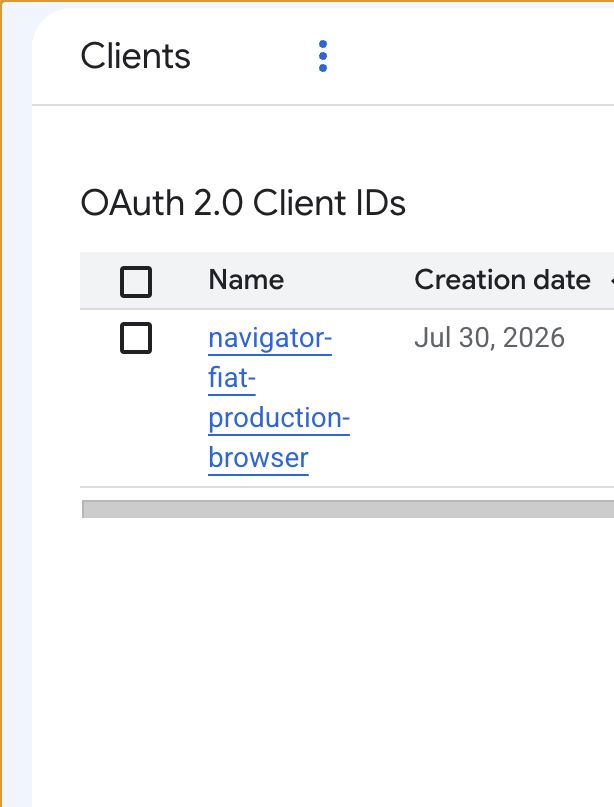
-
In the Google Cloud console, switch to the GCP project in the deployment matrix for the target deployment. This is
neon-lawforneon-law-prod,neon-law-prodforneon-law-prod, andneon-law-stgforneon-law-stg. Do not create a client's credentials in a different project and copy them across. -
Open Google Auth Platform → Clients, then select Create client. If Google first opens the Auth Platform setup screen, complete the organization-approved branding, support contact, audience, and contact-email setup before continuing. That one-time configuration is project-scoped; it is not a replacement for the client below.
-
Choose OAuth client ID, set application type to Web application, and name it
navigator-<deployment>-browser. For example, Neon Law production isnavigator-neon-law-prod-browser. -
Leave Authorized JavaScript origins empty. Under Authorized redirect URIs, add exactly the single callback for that config from the preceding table. Do not add a wildcard, a second deployment's callback, or a guessed local URL.
-
Select Create. Google displays a dialog with two values: Client ID and Client secret. Copy both before closing it. The secret cannot be recovered from this dialog later; create a replacement client if it is lost.
-
In that deployment's
deployments/<name>/tree, save the values under these exact names:Google creation-dialog value Where it lives Client ID NAVIGATOR_OAUTH_CLIENT_ID_BROWSERinconfig.tomlClient secret OAUTH_CLIENT_SECRETinsecrets.enc.yaml(sops set)Save them only in their matching deployment. The Client ID is public metadata but is still deployment-specific; the client secret is a credential and must never go in a terminal transcript, Slack, this repository in plaintext, or a screenshot.
-
Reopen Google Auth Platform → Clients and verify the client name and its single redirect URI. Then run the normal secret synchronization and ship dry run. The deployment operator preflight is deliberately non-interactive: it refuses a row whose
NAVIGATOR_OAUTH_CLIENT_ID_BROWSERorOAUTH_CLIENT_SECRETis absent and prints that row's project, client name, and exact callback. It verifies presence, not that a non-empty value is a usable Google credential.
Do not recycle a browser client, callback, or secret across rows.
Delete the obsolete navigator-neon-law-stg-browser, navigator-neon-law-stg-gemini, navigator-neon-staging-browser,
and navigator-neon-staging-gemini registrations from the neon-law-stg project. Their retired configs are not proof
that the Google registrations are gone, and no surviving deployment may reuse one of those client IDs, callbacks, or
secrets.
GitHub: four organizations and four private Apps
For each organization, a GitHub owner must:
- confirm the existing GitHub Free organization, contact email, controlling business, and current sole owner; add no bootstrap invitation, then handle two-factor enforcement and any approved recovery owner in a separate access review;
- confirm the private, organization-owned GitHub App in the table is installed only in that organization;
- grant repository Contents and Issues read/write;
- put that row's organization, App ID, and private key in
NAVIGATOR_GITHUB_ORG,NAVIGATOR_GITHUB_APP_ID, andNAVIGATOR_GITHUB_APP_PRIVATE_KEY.
The Apps own no Project repositories: Navigator provisions none. What is left is the neon-law/navigator webhook and
the DevX Restate services, which are the neon-law-stg singleton.
Provider signups that require a human account owner
- DocuSign: create Developer/demo attachments for staging. Production needs production eSignature accounts and
Go-Live-approved integrations. The deployment's
secrets.enc.yamlreceives the account/base/OAuth IDs, JWT app/user/private key, signer, Connect HMAC, and path secret. Prove a completed demo or deliberate production envelope and its verified Connect delivery. - Twilio SendGrid: create account or subuser boundaries with four separately revocable keys and webhook
configurations, and authenticate each sender domain. The deployment's
secrets.enc.yamlreceives the mail API key, From address, inbound and event secrets, and signed-event public key. Prove outbound delivery, inbound parse, and a signed event callback. - Google Workspace Drive: create three Shared Drives and service accounts. A Super Admin grants Drive domain-wide
delegation to each service-account OAuth client. The deployment's tree receives the selected Drive ID and delegated
user (
config.toml) and service-account JSON (secrets.enc.yaml). Prove a synthetic file can be created, read, and archived only in the matching Drive. - Restate Cloud: arrange an account and plan supporting at least three environments; the free tier is insufficient.
The deployment's
secrets.enc.yamlreceives that row's broker, ingress, admin URL, and API key. Prove the worker registers and completes a durable workflow in that environment. - Production contracts: an API-capable DocuSign plan and a SendGrid plan supporting the required webhook count may be paid subscriptions. A production deployment must not contain a demo DocuSign host, demo account, or staging sender.
For SendGrid, create a restricted mail-send API key rather than a billing-capable key and enable signed webhook
verification. For Drive, authorize only https://www.googleapis.com/auth/drive. For Restate, never point two rows at
the same environment in the target state: its journal is state, not a stateless endpoint.
Keep provider attachments deployment-local
Do not copy a production provider bundle from staging or another brand. Each deployment's deployments/<name>/ tree
owns its GitHub App, Restate journal, DocuSign attachment, SendGrid credentials and webhooks, OAuth clients, Drive root,
database, session key, and application-signing keys. Run the names-only parity gate (it runs inside the workspace test
suite on every pull request) and the provider smoke tests per deployment, then let a --dry-run ship enforce the actual
boot-key contract.
ops ship --dry-run detects a missing or empty boot key before it applies a workload, but it cannot prove that a
non-empty provider credential is valid. Treat a placeholder such as SG.test only as a bounded diagnostic that proves
the next preflight branch; replace it with the deployment's restricted SendGrid key and run the outbound, inbound, and
signed-event smoke tests before a production ship. A placeholder can let a pod boot while the first real email fails,
which is useful evidence during setup but never production readiness.
When a dry-run prints a kubectl patch secret remedy, read it as the exact missing-key diagnosis—not as the durable
repair. Add the value only to the named deployment's secrets.enc.yaml (or config.toml for a coordinate), then run
navigator ops secrets apply --deployment <name> and rerun the same ops ship --dry-run. A hand-patched Kubernetes
Secret is drift the CSI projection will replace. Work one reported requirement at a time: the guard stops before the
workload apply, so the next dry-run is the authoritative check for the next missing boot dependency.
Before the first ship, write each deployment's Secret Manager objects from its tree:
navigator ops secrets apply --deployment <row> --deployments-dir . --dry-run
navigator ops secrets apply --deployment <row> --deployments-dir .
Repeat per deployments/ directory. The dry run reads key names only — no KMS call, no decrypted value — and fails
closed listing any object the SecretProviderClass projects that the tree does not supply. It never writes DNSimple,
gcloud, or operator-session values into Secret Manager; the tree cannot even express them.
Presence is only the first audit, and it runs in CI: the parity gate in cli/src/devx/deployments.rs checks every
deployment's key names against store::deployment::WEB_REQUIREMENTS on every PR. Then run navigator ops ship --deployment <name> --dry-run and perform the provider smoke tests above. Never paste a private key, token,
service-account JSON, or decrypted value into Slack or workshop notes — see
docs/deployment-secrets.md.
The external surface — every third party, in one place
Neon Law Navigator's runtime external surface has these services, in two kinds — platform services (the cloud the stack runs on) and feature vendors (each lights up one capability and stubs out cleanly when unconfigured):
| Service | What it gives you | Kind | At boot |
|---|---|---|---|
| Google Cloud | Storage, OIDC, archive | platform | required — provisioned by navigator ops gcp setup |
| Restate Cloud | Durable workflow execution (workflows-service) | platform | required — the workflow broker |
| Vertex AI | Inbound contract review | feature | optional — the stub reviewer until configured |
| GitHub | Private per-Project repositories | platform | required in the requested cloud topology |
| DocuSign | E-signature | feature | CI-harness stub; required in a normal dev deployment and production |
| Xero | Accounting / billing (ACCREC invoices) | feature | StubBillingProvider until XERO_* is complete |
| SendGrid | Outbound + inbound email | feature | CI-harness capture; otherwise required |
The two service deployments
A production install runs one Rust application in two operational roles:
navigator-web— the public portal, Navigator MCP/API routes, webhooks, health probes, embedded Rego authorization, and client-facing Documents/Engagements/Invoices views.workflows-service— the durable Restate worker that renders documents, advances workflows, sends emails, and runs the background side effects the portal schedules.
The split keeps the portal stateless: every side effect that needs durable retries belongs to the worker rather than to
a request handler. Lawyer and admin users with Project access work the matter through the firm workbench, over the
participation-scoped list that surface resolves for them. Clients use the portal file surface: they see only Projects
where they have a person_project_roles row, and the portal renders reviewed documents, Engagements, and invoices
without exposing storage vocabulary or GCS credentials.
Security architecture
flowchart TB
  client["Client browser"]
  lawyer["Lawyer/admin browser"]
  oidc["OIDC provider"]
  edge["HTTPS Gateway"]

  subgraph gke["GKE namespace"]
    web["navigator-web\nportal, Navigator MCP, APIs"]
    worker["workflows-service\nDurable worker"]
  end

  subgraph data["Private data plane"]
    pg["SurrealDB\nroles + project access"]
    docs["GCS documents bucket\nprivate blobs"]
    assets["GCS assets bucket\nprivate marketing objects\nserved through /assets"]
  end

  client --> edge
  lawyer --> edge
  edge --> web
  web --> oidc
  web --> pg
  web --> docs
  web --> assets
  web --> worker
  worker --> pg
  worker --> docs

  client -. "portal session only" .-> web
  lawyer -. "portal session + lawyer role" .-> web
Clients never receive GCS IAM, bucket URLs, or object paths. A client request enters through navigator-web, resolves
identity through OIDC, reads authorization from persons and person_project_roles, and streams only the
portal-visible matter files back through the app. Lawyer and admin access is not a second door: it enters through the
same service and the same database access model, and differs only in what the role and participation checks allow.
Chapter 6
Ship the Instance
Ship and verify
Provisioning gives you an empty cluster; now pin one deployment to one published release. The --deployment flag
selects the deployments/<name>/config.toml that supplies the exact project, cluster context, namespace, image name,
hosts, buckets, SQL instance, required browser OAuth client, and runtime Secret name. First-install order is
load-bearing: apply the deployment's Secret Manager objects, install observability so navigator-otel-env exists,
render the release, then apply it:
Before shipping from a checkout whose deployment changes have not reached your installed binary, install that checkout's
CLI. A stale global binary may enforce an obsolete ship contract even when the selected deployment's config correctly
carries the current production profile:
cargo install --path cli --force
An operator wrapper must make the same guarantee before it changes Kubernetes or GCP: build the selected checkout's
cli package, then prove that navigator ops secrets apply --help exists. Do not fall back to an arbitrary
pre-existing target/release/navigator; a stale binary can lack a subcommand the current runbook requires and stop only
after it has already refreshed cluster credentials. Browser OAuth values belong in the deployment's tree before the
wrapper starts, so preparation is non-interactive. Keep explicit confirmations only for irreversible resource retirement
and the live release roll.
The failed guard runs before manifest rendering or cluster mutation. Install the matching CLI, set both environment and
credential profiles to production in the deployment's config.toml, then run the complete sequence:
navigator ops secrets apply --deployment <row> --deployments-dir .

navigator ops observability --deployment <row> --deployments-dir .

navigator ops ship --deployment <row> --deployments-dir . --tag YY.M.D --dry-run

navigator ops ship --deployment <row> --deployments-dir . --tag YY.M.D
ops observability is safe before the application Deployments exist: it creates the namespace-scoped collector and
navigator-otel-env ConfigMap, then skips the optional Deployment patch because ops ship renders that wiring into new
Deployments. A cold Autopilot cluster may take several minutes to create its first nodes and start the managed
Prometheus admission webhook. The CLI retries an idempotent IAM binding while a new navigator-otel Google service
account propagates. Before it applies collector-monitoring.yaml, the Rust CLI uses Google ADC and the Container API to
read the selected GKE cluster endpoint and CA, then queries the managed gmp-operator Endpoints object with its
Kubernetes client. It waits only while that object has no ready addresses; a RUNNING GKE cluster is not treated as
proof that the admission webhook is ready. The endpoint wait is bounded to three minutes and prints each attempt. If it
expires, inspect the managed operator rather than deleting the collector or patching the Secret:
kubectl --context "$NAVIGATOR_GKE_CONTEXT" -n gke-gmp-system \
  get deployment,pods,endpoints gmp-operator
When the managed operator becomes ready, rerun the exact same navigator ops observability or three-deployment operator
command. Namespace creation, Secret reconciliation, Google service-account creation, IAM bindings, and collector
manifests are all idempotent; a partially completed first run is a resume point, not a cleanup instruction.
The staging dogfood run also proved two quota-independent defaults. Autopilot clusters are created with
--enable-private-nodes, so a new region does not need one public in-use address per node. The link-out compatibility
writer uses the standard persistent-disk class, not an SSD-backed class; it must not consume SSD_TOTAL_GB for an
otherwise empty mount.
Post the verified handoff in #navigator
Post only after the verification loop prints all three OK lines. Replace YY.M.D once with the deployed tag and
preserve the config/host mapping exactly. The message body is:
:white_check_mark: Navigator YY.M.D is live on three deployment stacks
Verified /readyz, /version.release == "YY.M.D", and a browser visit:
Set exactly one website to one published version:
Choose its name from the deployments/ tree (host is that config's NAVIGATOR_PUBLIC_HOST), set tag, then run:
name=neon-law-stg tag=YY.M.D
host=$(sed -n 's/^NAVIGATOR_PUBLIC_HOST = "\(.*\)"$/\1/p' "deployments/${name}/config.toml")
gcloud auth login --force --update-adc

set -a; eval "$(grep ' = "' "deployments/${name}/config.toml" | sed 's/ = /=/')"; set +a
gcloud container clusters get-credentials "$NAVIGATOR_GKE_CLUSTER_NAME" \
  --region "$NAVIGATOR_GCP_LOCATION" \
  --project "$NAVIGATOR_GCP_PROJECT_ID"

navigator ops secrets apply --deployment "$name"
navigator ops observability --deployment "$name"
navigator ops ship --deployment "$name" --tag "$tag" --dry-run
navigator ops ship --deployment "$name" --tag "$tag"

curl --fail --show-error --silent "https://${host}/readyz" >/dev/null
curl --fail --show-error --silent "https://${host}/version" |
  jq --exit-status --arg tag "$tag" '.release == $tag'
Change only name and tag; the host follows from the config. The current tree maps:
neon-law-stg→staging.neonlaw.comneon-law-prod→www.neonlaw.comneon-law-prod→www.neonlaw.com
All three hosts resolve to their own deployment's gateway IP, so all three answer /readyz and /version directly.
Point your domain at the instance (optional)
navigator ops gcp setup reserves a static gateway IP but deliberately does not touch DNS. Keep this boundary: do not
put the DNSimple token in any deployment's tree, and do not make DNS a side effect of GCP provisioning. Apply this one
reviewed transaction directly with the DNSimple CLI.
The exact one-time transaction below is the three-deployment record set: one public and one workflow address per
deployment. Review current state before applying it and omit any create whose exact record already exists. The apex
continues to redirect neonlaw.com to https://www.neonlaw.com.
This block is the pre-cutover
neonlaw.comrecord set and has not been rewritten for the host map above. It records the single-zone state live in DNSimple today, including the exact record ids its preflight compares against, so it is reproduced verbatim rather than machine-edited. Moving the firm's production towww.neonlaw.comand Neon production towww.neonlaw.comsplits this one zone into three, and each new zone needs its own registration, records, managed certificate, and OAuth redirect URI before any record here is deleted. Treat the block below as the state to migrate from.
export DNS_ACCT=174981
export DNSIMPLE_TOKEN="$DNS_SIMPLE"

dnsimple records list neonlaw.com --account "$DNS_ACCT" --json |
  jq --exit-status '
    .data as $records |
      ([$records[] | select(.name == "" and .type == "URL")] == [{
        id: 80303423,
        zone_id: "neonlaw.com",
        type: "URL",
        name: "",
        content: "https://www.neonlaw.com",
        ttl: 300,
        regions: ["global"],
        created_at: "2026-07-23T22:08:37Z",
        updated_at: "2026-07-23T22:08:37Z"
      }]) and
      ([$records[] |
        select(
          .name == "staging" or
          .name == "workflows-staging" or
          .name == "neon" or
          .name == "workflows-neon-law-prod" or
          .name == "www" or
          .name == "workflows"
        )
      ] == [{
        id: 80303569,
        zone_id: "neonlaw.com",
        type: "URL",
        name: "www",
        content: "https://www.neonlaw.com",
        ttl: 300,
        regions: ["global"],
        created_at: "2026-07-23T22:14:28Z",
        updated_at: "2026-07-23T22:14:28Z"
      }])
  '

dnsimple records delete neonlaw.com 80303569 --account "$DNS_ACCT" --yes

dnsimple records create neonlaw.com --account "$DNS_ACCT" --type A --name staging \
  --content 34.160.169.219 --ttl 300
dnsimple records create neonlaw.com --account "$DNS_ACCT" --type A --name workflows-staging \
  --content 34.160.169.219 --ttl 300
dnsimple records create neonlaw.com --account "$DNS_ACCT" --type A --name neon \
  --content 34.149.196.255 --ttl 300
dnsimple records create neonlaw.com --account "$DNS_ACCT" --type A --name workflows-neon-law-prod \
  --content 34.149.196.255 --ttl 300
dnsimple records create neonlaw.com --account "$DNS_ACCT" --type A --name www \
  --content 8.233.220.29 --ttl 300
dnsimple records create neonlaw.com --account "$DNS_ACCT" --type A --name workflows \
  --content 8.233.220.29 --ttl 300
The provider-side record list and a public resolver must return all six paired addresses after the transaction. The apex
returned 301 https://www.neonlaw.com/. The temporary token was then removed from the shell and can be revoked in
DNSimple; record serving and propagation do not depend on it.
Run the mail record groups once for the neonlaw.com zone—not once per deployment—using --google-workspace,
--sendgrid, DKIM/link-branding targets, SPF includes, and DMARC settings. The command is additive and never deletes
unrelated records. The full record ownership and Google Workspace forwarding recipe is in docs/dns.md.
Drive it from the CLI
Once your instance answers /readyz, the navigator CLI runs the firm's whole matter flow against it from your
terminal. It authenticates like gcloud auth login and lands a short-lived (~8h) token at ~/.navigator.json:
cargo install --path cli          # installs `navigator` on your PATH
# …or skip installing — run it straight from the source tree:
cargo run -p cli -- login --host www.your-domain.example   # `cargo run -p cli -- <args>` == `navigator <args>`
Make it yours — white-label under your own brand
Neon Law Navigator runs three registered brands from one binary. A deployment operator can ship it under another
identity without forking source by describing the organization once in a private navigator.yaml bundle:
cp cli/tests/fixtures/navigator.example.yaml navigator.yaml   # then edit: names, emails, domain, logos
cargo run -p cli -- ops rebrand build --out .devx/brand-bundle   # deprecated compatibility command
cargo run -p cli -- ops rebrand verify --dir .devx/brand-bundle   # deprecated compatibility command
set -a; source .devx/env; set +a                # object storage and the rest of the runtime env
NAVIGATOR_CUSTOM_BRANDING=.devx/brand-bundle cargo run -p neon
This is how we set up our production deployment
Everything above is the recipe. This is the log of us following it for our own production deployment, serving
www.neonlaw.com. It is written down because the first install into a cold cluster went differently from the happy
path, and the difference is worth knowing before you hit it.
It is the row that holds real matters, so it went last — after the same release had first proven itself on staging.
navigator ops gcp setup had already built the project's half of the world: the neon-law-prod GKE Autopilot cluster,
the navigator-secrets KMS keyring, five core storage buckets plus any named archive/telemetry lanes, and the reserved
global address neon-law-prod-gateway-ip.
Then the first ops ship failed, and kept failing. Three things were in the way, in the order we hit them.
The object list was a superset. ops secrets apply --deployment <row> --deployments-dir . --dry-run failed closed
naming nine DocuSign objects. That deployment executes no documents: it supplies no DOCUSIGN_BASE_URL, declines the
integration, and runs StubSignatureProvider. But the shared SecretProviderClass referenced all nine anyway, plus the
three engineering-webhook objects scoped to the automation home that this project must never hold. A CSI mount fails the
whole volume on one object it cannot read, so the only way past was a placeholder credential — and a placeholder boots
the real provider, because DocuSignSignatureProvider::from_env returns Some for any non-empty value. A green
deploy that fails on its first signature request, on the deployment holding real matters.
That was a genuine defect rather than a configuration mistake, and the fix was to render the object list per deployment
so the class references exactly what the deployment writes. It is described in
docs/deployment-secrets.md. If your own deployment declines an integration the manifest
names, this is the machinery that lets it.
Secret Manager was empty. With the object list correct, one command filled it:
navigator ops secrets apply --deployment <row> --deployments-dir .
Twenty-five objects written, twelve reported as skipped with their reasons. Read that skipped line — it is also the list of what this deployment's mount will not ask for.
A cold cluster has no namespace, and no Secret to preflight against. This is the one to plan around. ops ship
confirms the deployment's Secret satisfies the running binary's boot invariants before it reconciles anything, which
is the right order for every ship after the first — an unsatisfied requirement aborts a ship that has touched nothing.
On a first ship it is a standoff: the namespace is created by the apply in step 5, and the Secret is projected by the
CSI driver only while a pod mounts the volume, so neither exists when step 4 goes looking. The failure reads:
Error: kubectl get secret neon-law-prod-web-secrets failed:
Error from server (NotFound): namespaces "neon-law-prod" not found
We broke the standoff by hand: created the namespace, then seeded a plain neon-law-prod-web-secrets Secret from the
Secret Manager objects ops secrets apply had just written, so the preflight had something real to read. The projected
Secret takes the same name, so once the pods are up and the driver owns it, the seeded one is retired exactly as
"Retire the plain Secret" describes.
Do not read that paragraph as a runbook. Doing it by hand is off the invariant this whole workshop rests on — the
navigator CLI orchestrates every machine-bound flow, and reaching around it with ad hoc commands is precisely what
leaves the next operator without a path. The bootstrap belongs in the CLI, and the shape it should take is a preflight
that falls back to the key set the rendered SecretProviderClass will project when no live Secret exists yet: those
objects are already proven to resolve to an ENABLED version before the reconcile, so it checks the same property from
the authoritative source instead of from a cluster that has nothing in it. Until that lands, a first install into a cold
cluster needs a human, and you should expect it.
A cold Autopilot cluster has no nodes, and that stops the reconcile. With the Secret readable, ops ship rendered
and diffed, then failed on an admission webhook:
Error from server (InternalError): failed calling webhook
"validate.rules.gmp-operator.gke-gmp-system.monitoring.googleapis.com":
no endpoints available for service "gmp-operator"
The chain is circular and worth recognising on sight. Autopilot provisions nodes for workloads; a cluster nobody has
shipped to has none. With no nodes, the managed Prometheus operator cannot schedule — ours had been Pending for 44
hours — so its admission webhook has no endpoints, and the Rules object in the exports overlay cannot be validated.
The ship is blocked by the absence of the very workload it is trying to create.
ops observability is what breaks it, and this is exactly why the first-install order puts that command before ops ship rather than after. It applies the collector Deployment first — a workload, which makes Autopilot provision a node,
which lets the operator schedule — and only then does it wait for the webhook and apply the monitoring manifests. Run it
and watch a node appear:
navigator ops observability --deployment <row> --deployments-dir .
Skipping it, as we did, turns a documented ordering into forty minutes of diagnosis. Run the order as written.
Then the ship works. Every manifest applied, navigator-web and workflows-service both rolled out, and the five
trigger CronJobs pinned to the tag. ops ship still exited non-zero, at the last step: it re-registers the worker
with Restate and refuses to call a ship complete when that fails, because a stale handler list means webhook submissions
fail silently later. That is the check behaving correctly — RESTATE_ADMIN_URL and RESTATE_ADMIN_TOKEN live in the
deployment's encrypted tree for the operator, and CI supplies them from secrets.
The DNS cutover, and the gap it costs. The Ingress carries the annotation
kubernetes.io/ingress.global-static-ip-name: neon-law-prod-gateway-ip, so it claims the address reserved during
provisioning — wait for it to appear before touching DNS, because until GKE finishes the load balancer there is nothing
behind that IP:
NAVIGATOR_GATEWAY_IP=$(gcloud compute addresses describe neon-law-prod-gateway-ip \
  --global --format='value(address)')
navigator ops dns setup --domain neonlaw.com --gateway-ip "$NAVIGATOR_GATEWAY_IP" --dry-run
Two calls: www patched off the old address, workflows created. The command never deletes. Then the wait described in
Pointing a hostname at a deployment begins, and it is a real
outage — the hostname serves neither the old site nor the new one while Google validates. Ours ran about twelve minutes
for www. FAILED_NOT_VISIBLE on the way through is normal: it records validation attempts made while DNS still
pointed elsewhere, and clears itself.
Retire the old certificate after the cutover has settled, not during it. www.neonlaw.com was previously served by
a Certificate Manager certificate authorized through an _acme-challenge.www CNAME. That record is inert once the
hostname points at GKE — managed certificates validate through the load balancer, not the ACME DNS challenge — but it is
also what keeps the old certificate renewable, and the old certificate is what makes a DNS rollback instant. Retire the
certificate, its authorization, and the record together, once you have decided not to roll back.
The lesson we would give another deployer is the one the release order already encodes: the deployment that carries real client matters goes last, and it goes last precisely because the first install is where you learn what the recipe assumes. Ours assumed a cluster that had already been shipped to once — and every gap above is one the two earlier deployments could never have found, because by the time they shipped, someone had already shipped to them.
Chapter 7
Wrap Up
Canonical references
This workshop is the narrative; these docs are the source of truth and stay current — prefer them when they disagree:
docs/oss-install.md— the full end-to-end install (env, Secret, overlay, image, verify).docs/deployment-secrets.md— production secret rendering.docs/third-party-integrations.md— the per-environment vendor-account convention.docs/docusign-esignature.md— e-signature setup and the one-app, two-environment model.
You finished — claim your certificate
Enter your name and email and Neon Law will send a PDF certificate of completion.
We use your email only to send this certificate.